
How permissions work: resource, action and scope
Every button and page in the portal is gated by a permission made of a feature, an action and, for some features, a scope.
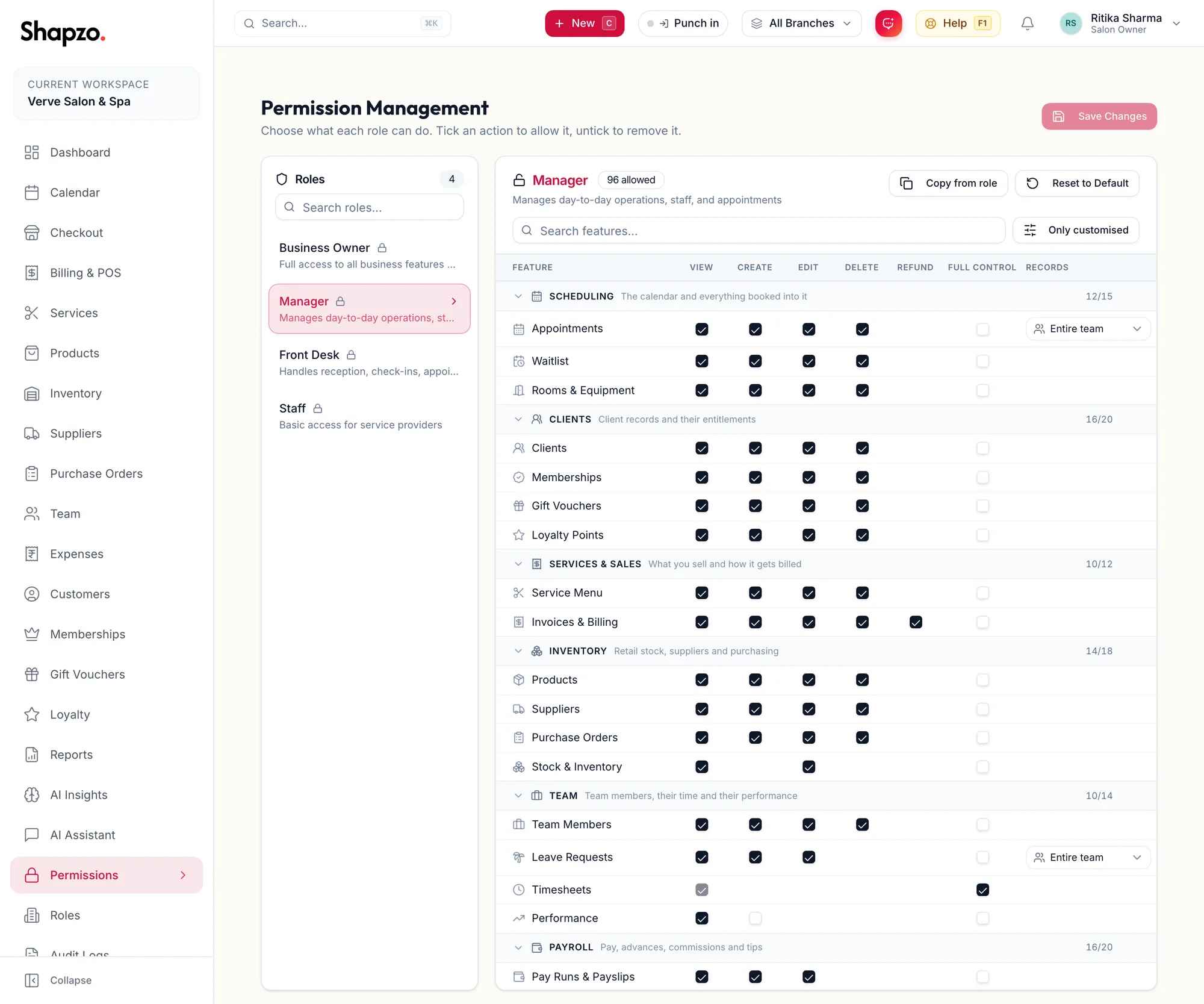
The three parts
Feature. Everything the portal does is grouped into modules: Scheduling (the calendar and everything booked into it), Clients, Services & Sales, Inventory, Team, Payroll, Reports & AI, Admin & Settings and Own Data. Each module has features such as appointments, customers, invoices, products, staff, leaves, pay runs, reports, roles.
Action. For each feature a role can have View, Create, Edit, Delete, and on invoices Refund. Full control grants all of them plus management actions such as approving pay runs; the page notes Full control already includes View, Create, Edit and Delete.
Scope. For appointments, leave, salary advances, expenses and reports, the Records column at the end of the row holds a scope: Own records (Only records this person created or is assigned to) or Entire team (Every record in the business). A stylist with Own records on appointments sees only their own column; a manager with Entire team sees everyone.
Own Data
The Own Data module is what a team member may see about themselves: View own commissions, View own payslips, View own timesheets, View own tips and Punch in / out of own shifts. These give a stylist their My Salary tab and the punch clock without any wider access.
How it feels in the portal
- A page you cannot View is missing from the sidebar and search.
- A button you cannot use is missing, not greyed out. The New menu and the n shortcut follow the same rule.
- A report you cannot see is missing from the library, and the AI assistant cannot look it up for you either.
- The dashboard only shows the widgets your permissions allow.
System and custom roles
Shapzo ships System roles (owner, manager, front desk, staff and so on) with sensible defaults. Every business can adjust them, marked Customised for your business, or add Custom roles. The owner role is a Protected Role and always has everything.
Related articles
- Roles: create, clone, edit, delete · Roles, permissions & audit
- Change what a role can do · Roles, permissions & audit
- System access, roles and invitations · Team