
Prices per location and team member
Charge a different price, or allow a different duration, at one branch or for one senior stylist without creating a second service.
Steps
On the web
-
Open the service and go to Advanced pricing.
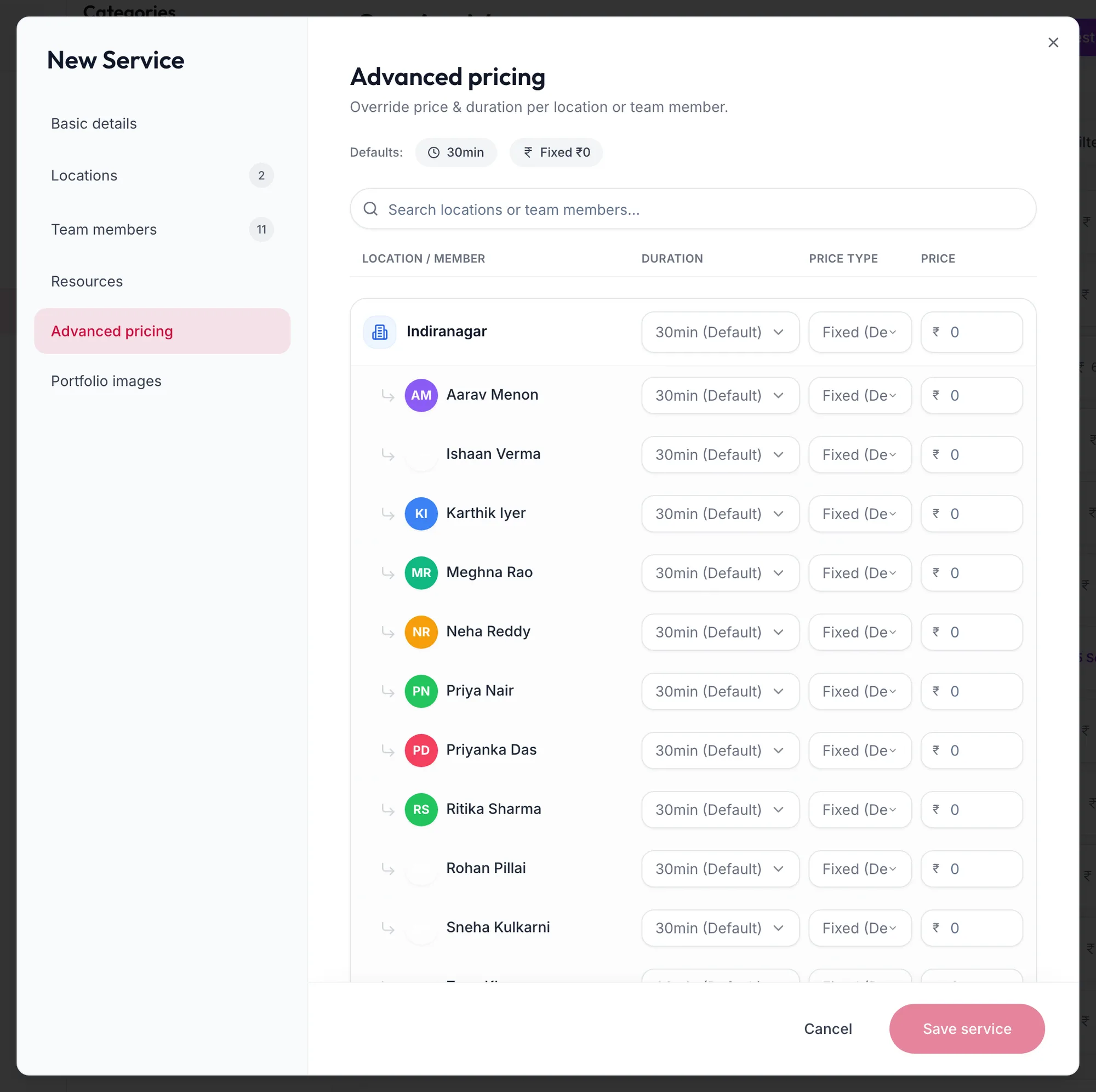
The Advanced pricing tab of a service -
The table lists each location under Location / Member, with the service's Duration, Price type and Price. Rows show {{value}} (Default) until you change them.
-
Change the price or duration on a location's row. It gains an Override badge.
-
Click Show {{count}} team members under a location to set a price for one person there, for example a higher rate for a senior stylist.
-
Save the service.
Reset on a row returns it to the default; Reset all ({{count}}) clears every override.
In the app
- Open the service and tap Advanced pricing.
- Each location is listed with the service's Duration, Price type and Price, shown as {{value}} (Default) until you change them. Change a location's price or duration and it gains an Override badge.
- Tap Show team members under a location to set a price for one person there.
- Tap Save service.
Reset on a row returns it to the default; Reset all ({{count}}) clears every override.
Where the override applies
- The booking form and checkout use the price for the selected branch and provider.
- Reports keep the actual price charged.
- The menu list shows the default price.
Related articles
- Add a service · Services & packages
- Variants and extra time · Services & packages