
Assign providers and rooms
Every service line names the team member who did it, because commission, performance and the calendar all follow that name.
Providers
Each service and package row has a Provider dropdown. It lists the team members who work at the selected branch and can perform that service.
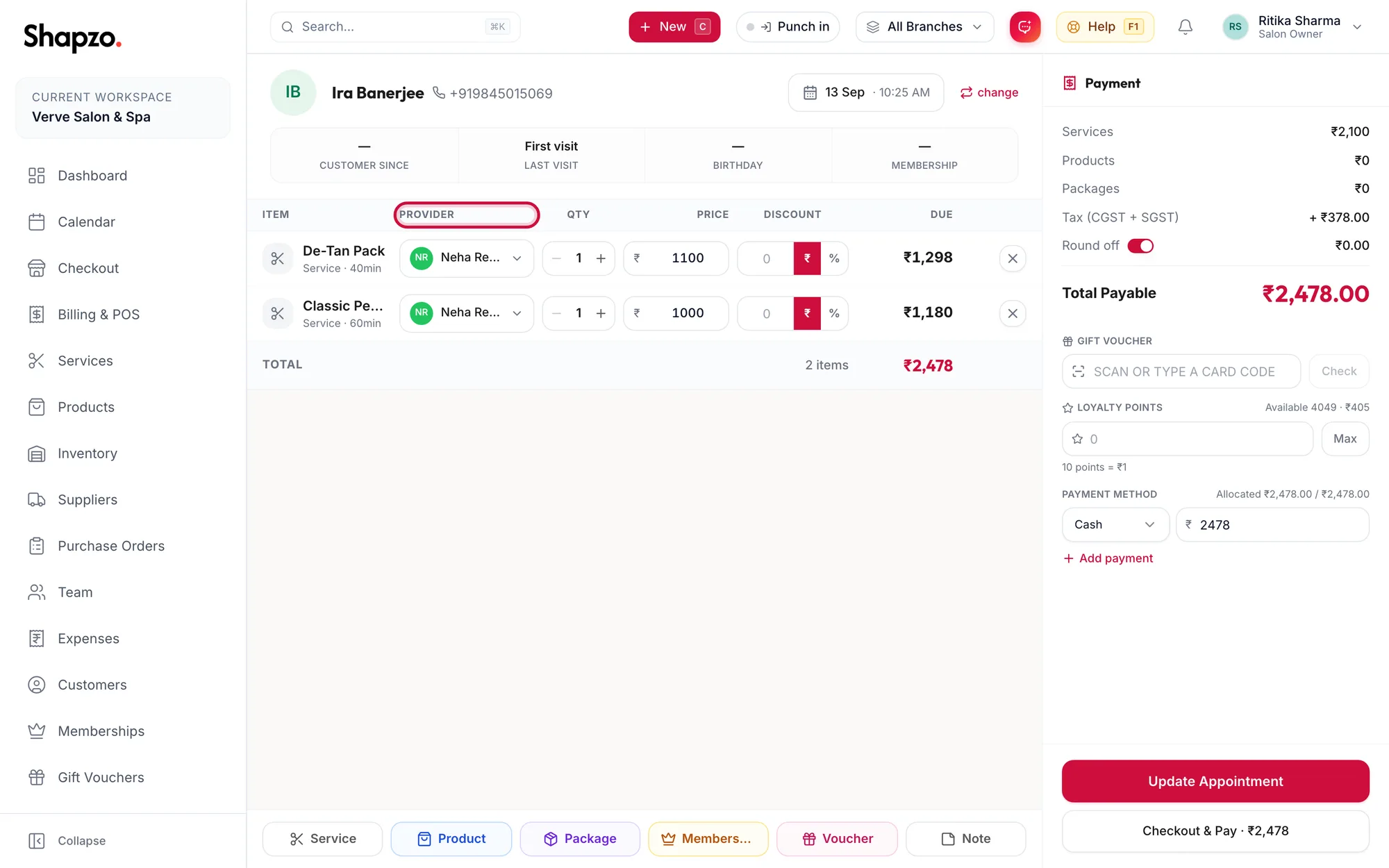
- When checkout opens from a booking, the provider is already the person the customer was booked with.
- For a walk-in order, pick the person who did the work. Any staff leaves it open, which is fine for a product but not for a service you want commission calculated on.
- A product row can carry a provider too, so a stylist who sells a shampoo earns product commission if their profile includes it.
Rooms
If the business books rooms and equipment, a Room column appears. Services whose type requires a room, for example a massage, show Select room. The list shows which rooms are free for the order's time; a room that is Fully booked or Unavailable cannot be chosen.
Why it matters
- Commission is worked out per line from the provider's commission profile the moment the invoice is paid.
- Performance and the Staff Leaderboard count revenue against the provider.
- When the order is saved as a booking, each service lands in that provider's calendar column.
Related articles
- Add services, products and packages · Checkout
- Rooms and equipment on the calendar · Calendar