
Redeem membership benefits at checkout
Apply a member's discount, pay from prepaid credit, or use a session, from the Membership benefits bar.
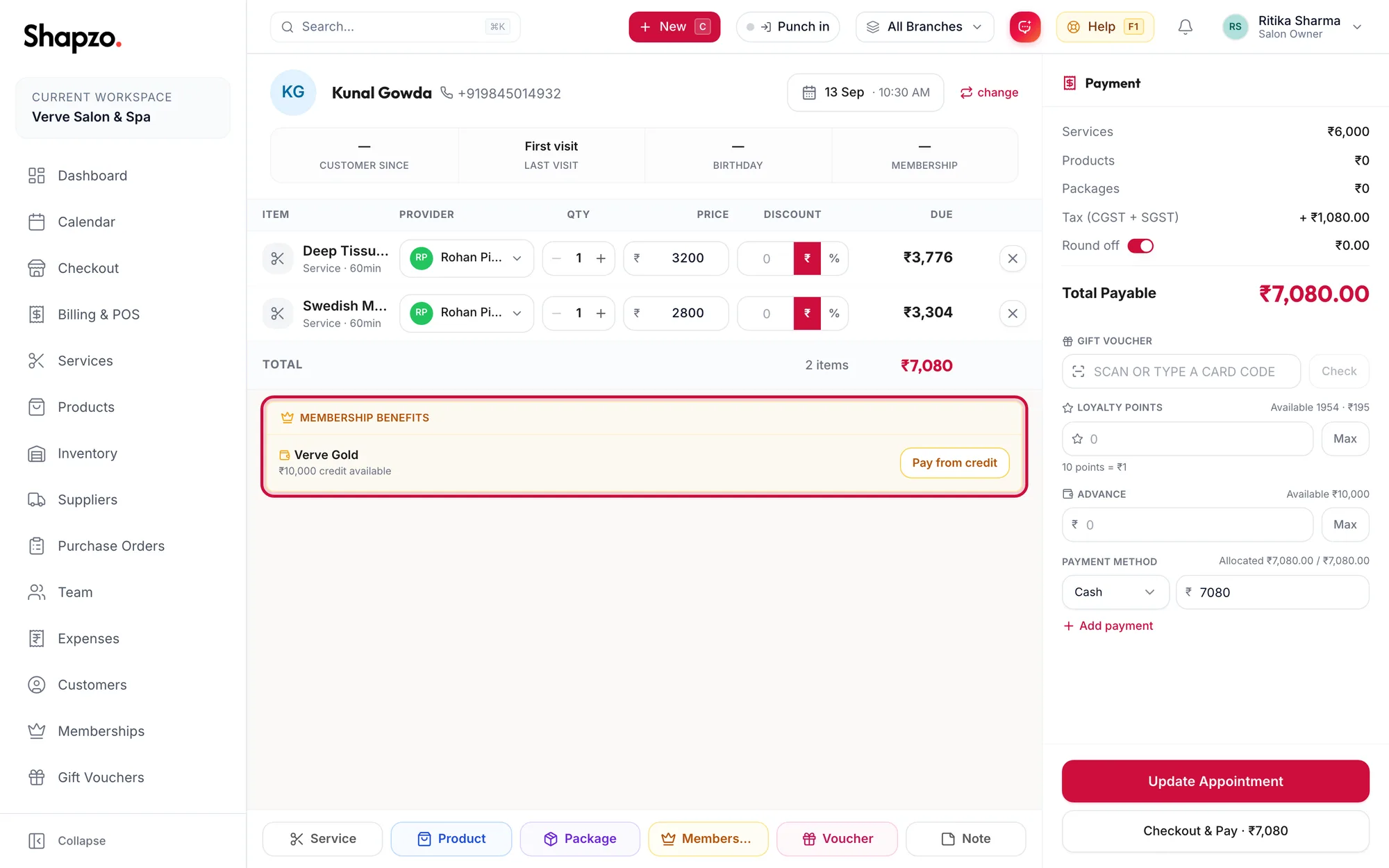
When the selected customer holds an active membership, a Membership benefits bar appears above the items grid. What it offers depends on the plan.
Discount plans
The bar reads {{value}} off applies to {{eligible}} of {{total}} services. Click Apply; it changes to Applied and the eligible lines are discounted. If the plan is set to Auto-apply at POS, this happens on its own.
Prepaid plans
The bar shows {{amount}} credit available. Click Pay from credit to settle the bill from the credit; the payment panel shows Paid from membership credit. Any shortfall is taken by another method.
Session plans
For each covered service in the order, click Use 1 session. The line becomes free and the panel shows Covered by membership sessions. When the plan is used up the button reads None left.
Packages the customer already owns
A separate Package benefits bar lists each package with {{count}} sessions left and its expiry. Click Use {{count}} sessions on a covered service; the line is billed at zero and the package's count goes down.
Gift card visits
A gift card that includes specific services shows a bar named after the card with Use 1 visit per included service.
Related articles
- Sell a membership at checkout · Checkout
- Membership plan types · Memberships