
Redeem a gift card and loyalty points
Apply a gift card's balance by code and spend loyalty points against a bill, alongside any other payment.
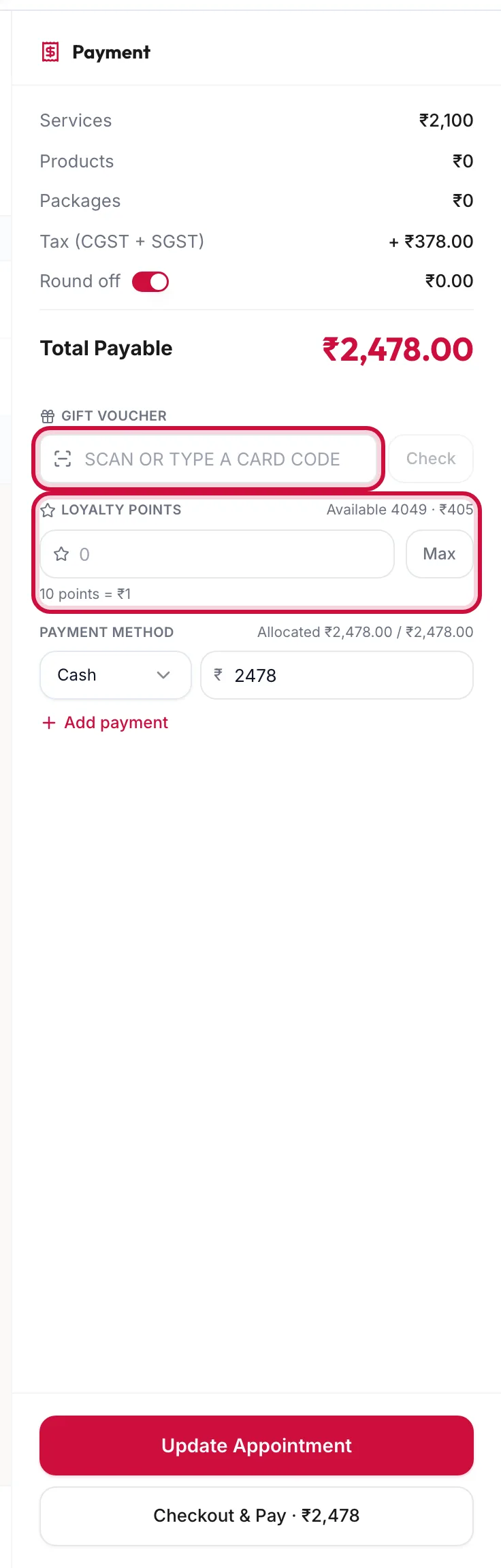
Redeem a gift card
- Under Gift Voucher in the payment panel, scan or type the card code and click Check.
- The card's balance appears. Enter how much of it to use and click Apply.
- The panel shows Paid from gift voucher; take the rest by another method and check out.
Remove takes the card off the order. A card that includes specific services is redeemed differently: its services appear in a benefit bar above the items with Use 1 visit per service.
Errors: Voucher not found means the code is wrong; Voucher is not valid means the card is expired, cancelled or fully used.
Spend loyalty points
Points show under Loyalty Points for a registered customer, with the balance next to Available.
- Enter the points to spend, or click Max for the most the bill allows.
- The panel shows Paid with {{points}} points and the rupee value.
The rules come from the loyalty programme: a minimum, multiples, and a maximum share of the bill. The panel explains with Redeem at least {{min}} points, in multiples of {{unit}} or Points cannot be used on this bill.
New points for this bill are added once the invoice is fully paid, at the programme's earning rate.
Related articles
- Sell a gift card · Checkout
- Set up the loyalty programme · Loyalty