
Reminders
Send customers automatic appointment reminders by the channels you choose, at the lead times you choose.
-
Open Settings, Scheduling, Time and calendar, and scroll to Appointment Reminders.
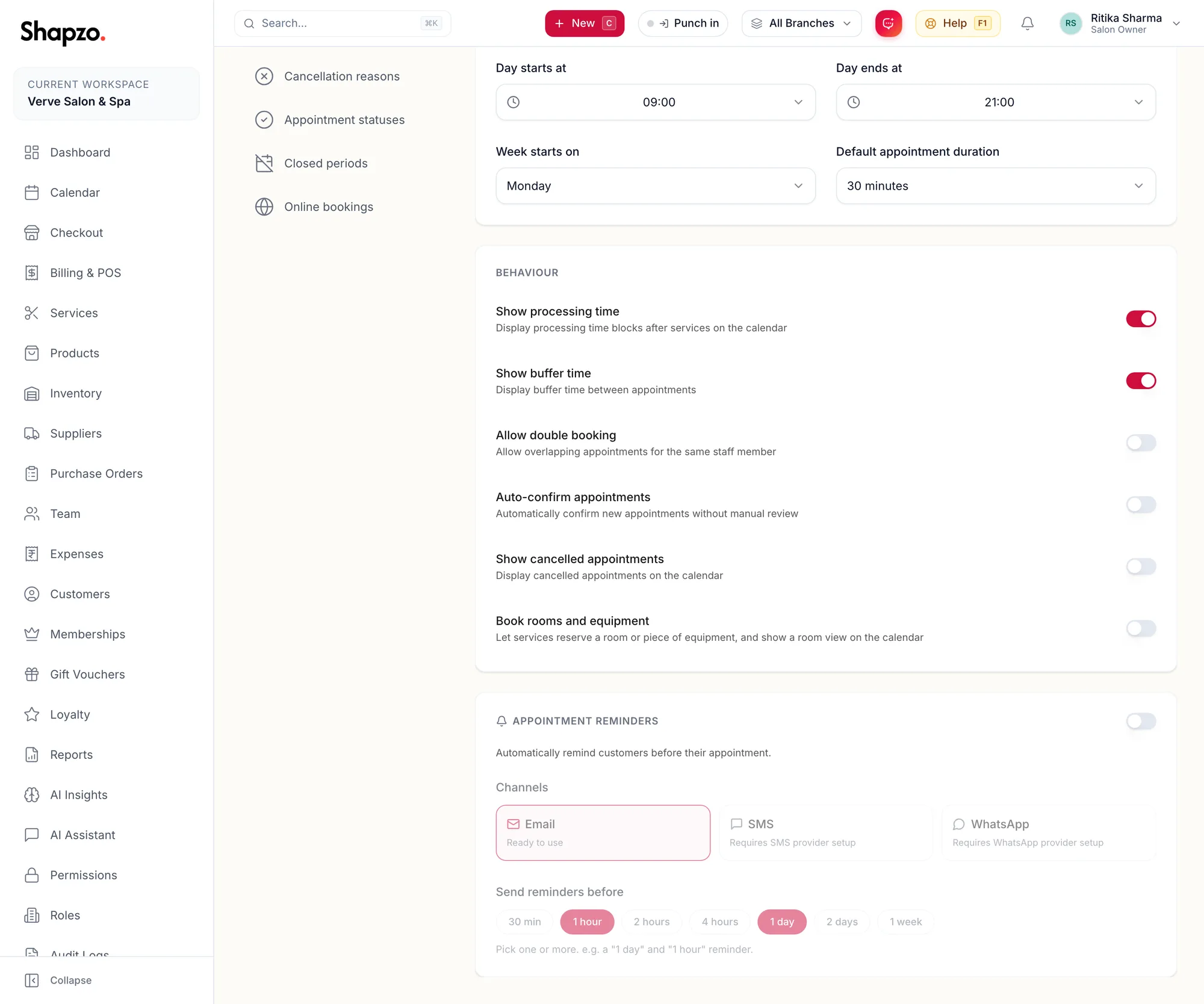
The Appointment Reminders card -
Switch on the card's toggle. It reads Automatically remind customers before their appointment.
-
Under Channels, pick Email, SMS or WhatsApp. Each shows Ready to use or what it still needs. Select at least one channel or no reminders will be sent.
-
Under Send reminders before, pick one or more of 30 min, 1 hour, 2 hours, 4 hours, 1 day, 2 days and 1 week. The page insists: Select at least one lead time.
-
Save.
What the customer gets
A message with the business name, the services, the date and time and the branch, in the language chosen on their profile where the template supports it. A customer whose Communication Preference is None is not messaged.
Channel readiness
Email is always available. SMS and WhatsApp show Requires SMS provider setup or Requires WhatsApp provider setup under Settings, Notifications until they are connected for your business; contact support to enable them.
Related articles
- Scheduling: time and calendar · Settings
- Notification preferences · Your account
- Gift card, dashboard default and notification settings · Settings